 一键登录


简介:
月末,谷歌网页翻译无法使用,究其原因不是大家所推测的“局势紧张”,而是因为谷歌翻译决定退出中国市场。
毕竟谷歌连在中国能用的业务也就是内核和翻译了,所以很受局限,占用率不高,确实如这位发言人所说,在国内,谷歌翻译有着非常多的竞争对手,诸如有道翻译、腾讯翻译、百度翻译、欧陆词典、彩云小译等等。这些产品翻译水准虽然不如谷歌翻译强大但已经足够满足日常需求,而且本地化功能和服务也很完善,谷歌翻译受制于多方面原因确实处于竞争劣势。
Google似乎已经在中国大陆地区结束了翻译业务并将访问者重定向到其香港的https://translate.google.com.hk域名,然而事实上当地用户并没有办法访问该域名。根据Reddit上的用户反馈和网站档案,Google在过去24小时内的某个时间点将https://translate.google.cn的Google翻译界面换成了一个普通的Google搜索页面。
Google发言人通过电子邮件告诉TechCrunch,该公司已经停止了Google翻译在中国大陆的服务,原因是"因为使用率低"。
解决方法1:
原理是获取谷歌翻译国内的地址,然后将该地址加入系统的 hosts 文件中。脚本已自动为大家完成了上述操作,同时智能选择了最快的翻译服务器。
1.将下面这串代码复制到记事本中打开
:: Copyright (c)2022 https://www.ecshopok.com
:: This is a batch script for fixing Google Translate and making it available
:: in the Chinese mainland. If you experience any problem, visit the page below:
:: https://www.ecshopok.com/article-866.html
@setlocal enabledelayedexpansion
@echo off
set "source_domain=google.cn"
set "target_domain=translate.googleapis.com"
set "hosts_file=C:\Windows\System32\drivers\etc\hosts"
for /f "skip=4 tokens=2" %%a in ('"nslookup %source_domain% 2>NUL"') do set ip=%%a
set "old_rule=null"
set "new_rule=%ip% %target_domain%"
for /f "tokens=*" %%i in ('type %hosts_file%') do (
    set "line=%%i"
    :: Retrieve the rule If the target domain has been exists in the line.
    if not "!line:%target_domain%=!"=="%%i" set "old_rule=%%i"
)
if not "%old_rule%"=="null" (
    if not "%old_rule%"=="%new_rule%" (
        echo Deleting the rule "%old_rule%"
        echo Adding the rule "%new_rule%"
        for /f "tokens=*" %%i in ('type "%hosts_file%" ^| find /v /n "" ^& break ^> "%hosts_file%"') do (
            set "rule=%%i"
            set "rule=!rule:*]=!"
            if "%old_rule%"=="!rule!" set "rule=%new_rule%"
            >>%hosts_file% echo(!rule!
        )
    ) else (
        echo The rule already exists, nothing to do.
    )
) else (
    echo Adding the rule "%new_rule%"
    echo.>>%hosts_file%
    echo.>>%hosts_file%
    echo # Fix Google Translate CN>>%hosts_file%
    echo %new_rule%>>%hosts_file%
)
echo Done.
pause
2.保存后,将文件后缀改为.bat
3.右键,以管理员方式运行,结束,即可正常使用
如果嫌上面的操作麻烦,这里可以直接下载这个补丁
点击下面立即下载按钮,下载谷歌翻译补丁
解决方法2:
1.在 Windows 系统中获取可用 IP 的方法为,打开“命令提示符”,输入以下命令并回车:nslookup google.cn
2.根据下面的Address地址,找到如下文件hosts,在属性中用记事本打开
C:\Windows\System32\drivers\etc\hosts
3.最后像下面这样将你所获取到的 IP 和 Google 翻译 API 的域名组合成一条 hosts 规则,并将其添加到 hosts 文件中的最后一行,保存文件后 Chrome 翻译功能即可恢复正常使用。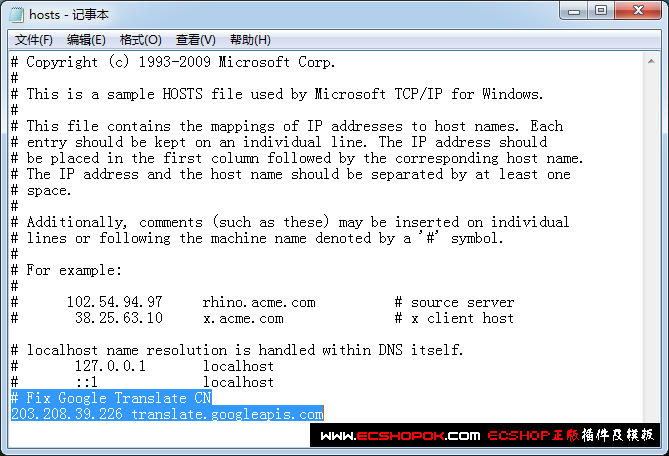
203.208.39.226 translate.googleapis.com
将修改好的文件,以文本形式,保存在桌面
然后删除后缀,将文件替换即可
在保存过程中他会自动提示你无法直接保存,是否选择以文本方式保存,这个时候一定要以文本保存在你容易找到的地方,然后删除后缀,再替换。


暂无评论,来发表一个吧